The head's code and wiring
The standard XGO-Duck has no screen, camera or voice. Ours has all three, run by a XIAO ESP32-S3 Sense in the head, with the UNO Q in the body moving the neck. Here's what each part does and how it's wired. None of it has met a real servo yet: they're still on their way.
Firmware on the XIAO
Written for the Arduino ESP32 core, with the board's PSRAM switched on because the camera needs it. It uses about a third of the flash and 41% of the memory.
- The eye. A small driver for the GC9A01 round screen using Waveshare's own start-up sequence, with no graphics library. The eye is drawn pixel by pixel, 20 rows at a time, straight to the screen with no frame buffer: a dark eye-white, an iris with fine radial streaks and a dark rim, the pupil, two highlights, and eyelids whose curves set the mood. Six moods, neutral, happy, sad, angry, surprised and sleepy, each with its own iris colour. It blinks and glances about on its own.
- The camera streams video on port 81, for a browser or for OpenCV. The control page turns the picture the right way up, because the camera is mounted on its side.
- Sound. The microphone is on the chip's first audio port (it has to be) and the speaker amplifier on the second. It can play tones, a chirp, WAV and MP3 files, record a few seconds, or record and play straight back.
- Control comes three ways: a web page and simple web commands at duck-head.local, text commands from the UNO Q over the serial link, or typed over USB.
- Updates over Wi-Fi after the first USB upload. If it can't join the home network, it makes its own called Duck-Head and serves the page from there. Wi-Fi details live in a separate file that never leaves the workshop.
Web commands
The kind of thing the UNO Q, or anything on the network, can ask the head to do:
/eye?mood=happyset the mood/look?x=0.3&y=-0.2look somewhere/blink,/bright?level=0-255/tone?hz=880&ms=200,/chirp,/play(send a WAV or MP3)/mic?s=3record three seconds,/echo?s=3record and play back/captureone photo,/statuseverything as JSON
Which way up?
The screen and camera both sit on their sides in the face plate, so the picture needs turning, and it's easy to get backwards. At power-up the screen shows a white arrow with a red dot on one side and a green dot on the other. The arrow should point up with red on the left; if not, one setting turns or mirrors the eye's picture. Another turns the camera picture on the web page.
Wiring
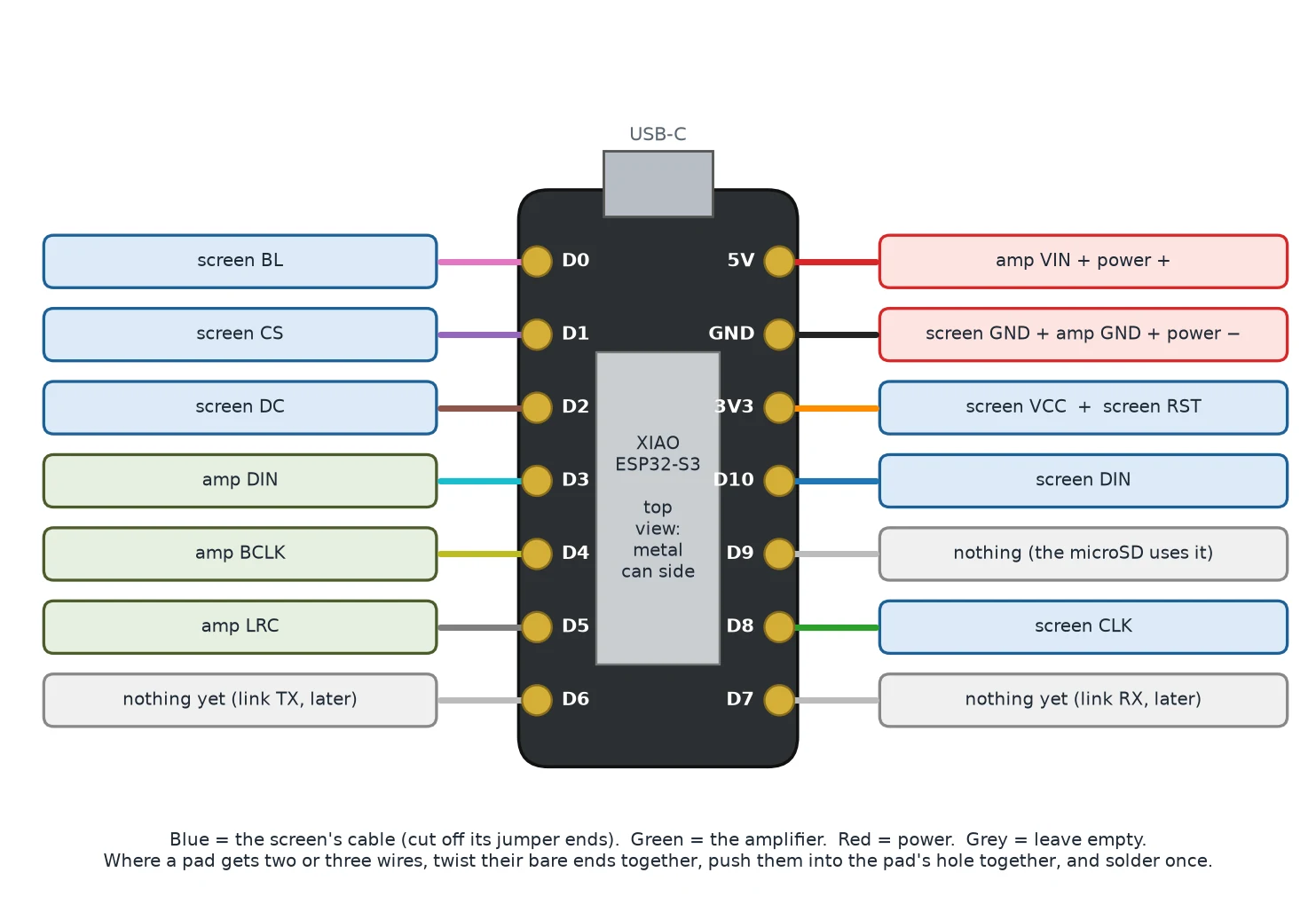
The screen cable's jumper ends are cut off and soldered straight to the XIAO's pads, leaving the white plug on the screen. Pins D6 and D7 are kept for the serial link to the UNO Q, and D9 is left free for the microSD slot on the camera board.
| Board | Pin | XIAO | Notes |
|---|---|---|---|
| Screen | VCC | 3V3 | |
| Screen | GND | GND | |
| Screen | DIN | D10 | SPI data |
| Screen | CLK | D8 | SPI clock |
| Screen | CS | D1 | |
| Screen | DC | D2 | |
| Screen | RST | 3V3 | Held high; the driver resets the screen by command |
| Screen | BL | D0 | Backlight, dimmable |
| Amplifier | VIN | 5V | |
| Amplifier | GND | GND | |
| Amplifier | DIN | D3 | I2S data |
| Amplifier | BCLK | D4 | I2S bit clock |
| Amplifier | LRC | D5 | I2S word select |
| UNO Q link | TX / RX | D6 / D7 | Serial, through the neck later |
Power. On the bench the XIAO runs from the UNO Q's 5V and GND pins, because the bracket covers its USB-C socket once it's in the face. Never power it from USB and the 5V pin at the same time. In the robot, a small 5 V regulator will feed the head from the battery so it doesn't load the driver board's own supply.
Python on the UNO Q
Three scripts, for the five neck and head servos on the bench, through Feetech's FE-URT2 USB board.
- A servo driver for Feetech's serial bus protocol: ping, read, write, move several at once and change an ID. It only needs pyserial, and it was tested against a simulated servo before any real ones arrived.
- The set-up wizard takes one servo at a time, gives it the ID the build guide expects and parks it at the centre of its travel (step 2047 of 4096) before it goes in the robot. It can also list every servo on the bus with its position, voltage and temperature, or switch them all off.
- The head script wiggles one joint so you can see which it is, runs a short demo of looking round, nodding, blinking and opening the beak, follows a face with its eye and head using OpenCV, and speaks through the head's speaker with espeak-ng while the beak flaps in time.
Servo IDs
From the XGO-Duck build guide: 10 to 14 and 20 to 24 for the legs, 30 to 34 for the neck and head, with 34 the beak. Each is centred at 2047 and set up alone on the bus. The guide doesn't say which head ID is which joint, so our names are a first guess, and every head joint is limited to a small range until we've found the real limits.
The bench stand and guide
The stand (S1) holds the head and neck by servo 30, between two ears copied from the body shells, with the UNO Q and the servo test board on its base. A ten-page guide covers the wiring, the first upload, fitting the screen and camera, setting servo IDs, the stand, the commands and what to check when something doesn't work. The whole story is in Firmware for a face.
Is the code available?
Not published yet.